
The whole back office on autopilot.
A wealth practice handed us the work that never ends: bookkeeping, bill pay, renewals, compliance records, and client reporting. We built one system that runs all of it around the clock, with a human approving anything that touches the books, and every action written to an audit trail.
The Problem
A white-glove firm, run entirely by hand.
The firm delivers a white-glove experience, and behind it was a mountain of manual work: books to keep in more than one accounting system, bills to approve, money moves to document, policies and registrations to renew before they lapsed, files to name and file, and client reporting to pull together by hand. The principal was genuinely excited about AI. He also handled Social Security numbers and bank accounts under SEC obligations, and security was non-negotiable. He wanted AI, but only in an environment where sensitive information can never leak.
He had done his homework. He had looked at off-the-shelf hub tools, the generic automation platforms, and decided against them. Running dozens of workflows on generic middleware becomes a management nightmare fast. What he wanted was the opposite of an app per workflow: his many documented manual processes consolidated into one system he could actually trust and supervise.
So the brief was clear. Take the busywork off the team, keep a person in control of anything that matters, and build it so the firm never has to wonder where its data went.
What Runs Today
Books, bills, and compliance, on autopilot.
The same engine that runs law-firm back offices runs financial ones. Each of these jobs runs on its own, all day, with a human approval gate wherever it counts.
Bookkeeping runs itself, then waits for a yes.
Transactions get categorized in both QuickBooks and Xero against the firm's own chart of accounts and rules. When the same call gets approved enough times, the system learns the rule. Nothing is ever written to the books until a person approves it in the review queue.
Bills never quietly slip past due.
Bill.com approval reminders surface bills that are coming due or sitting waiting, so the right person acts before a deadline, not after it. The firm approves. The system chases.
Money moves are confirmed on paper.
When the firm drops the source files into Box, the system generates the matching money-movement confirmations. Every transfer has a record behind it, produced the same way every time.
Nothing lapses on anyone's watch.
Insurance policies, property taxes, vehicle registrations, and card expirations are scanned every month. The right team member gets notified and the CRM workflow kicks off automatically, so a renewal is handled before it becomes a fire drill.
The document store stays clean.
Document hygiene keeps the Box store consistently named to the firm's convention. The AI proposes a compliant name, and a person approves it. Files stay findable instead of drifting into chaos.
The CRM stays the single source of truth.
A weekly sync pushes the team and roster from Wealthbox into the working database the automations run on. Wealthbox stays the record everyone trusts, and everything downstream matches it.
Secure client texting, all on the record.
Clients text one number. The system routes each message by role to the right advisor or analyst, keeps the full thread in one place, and records every message to an audit trail. Nothing lives on a personal phone, and nothing goes missing.
The Client View
Every household gets one live picture.
On top of the back office, each client household gets a live dashboard that pulls from the firm's real systems, not a static snapshot someone rebuilds every quarter. It brings a client's whole financial life onto one screen, and account numbers are masked to the last four everywhere they appear.
- •Investments and retirement, pulled from Orion
- •Budget and spending, pulled from Xero
- •Real estate and property
- •Insurance coverage
- •Credit and debt
- •Estate planning
- •Tax planning
- •A net-worth rollup across all of it
Investments and retirement come straight from Orion, budget and spending from Xero, and the rest from the systems the firm already runs. The result is a single, current answer to the question every client actually asks: where do I stand, across everything.
Inside the platform
What the firm actually sees.
These are real screens from the workspace we built, each one showing the same thing at ground level: the firm's live data pulled in from its own systems, with a person in front of anything that matters.
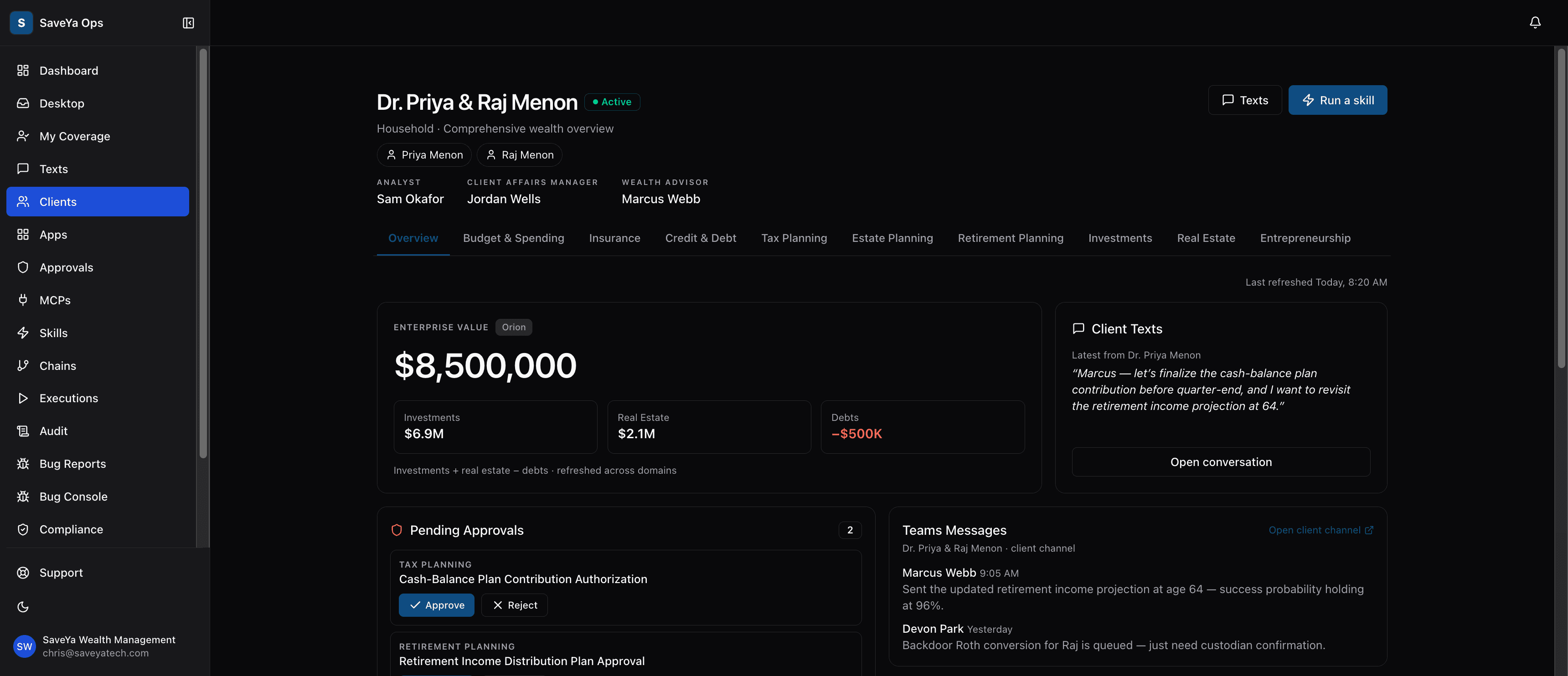
The household view
Every household on one screen.
A live overview for each client household: net worth pulled straight from Orion, the approvals waiting on a person, and the client's latest message, all in one place.
Nobody rebuilds it by hand. It is current every time it opens, and account numbers are masked to the last four wherever they appear.
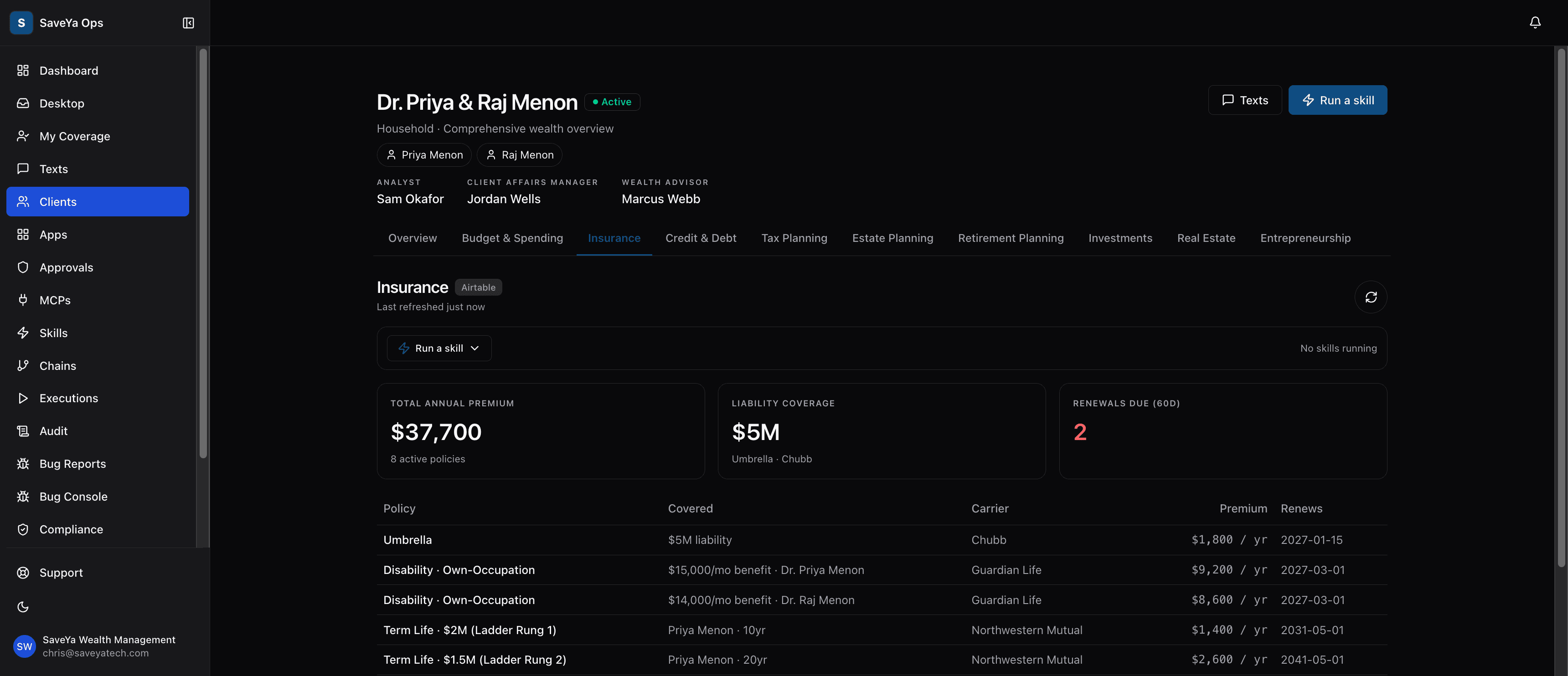
Insurance & renewals
Renewals that never slip.
The insurance view tracks every policy, carrier, and premium, and flags what renews in the next 60 days.
The right person moves before anything lapses, instead of finding out after the fact.
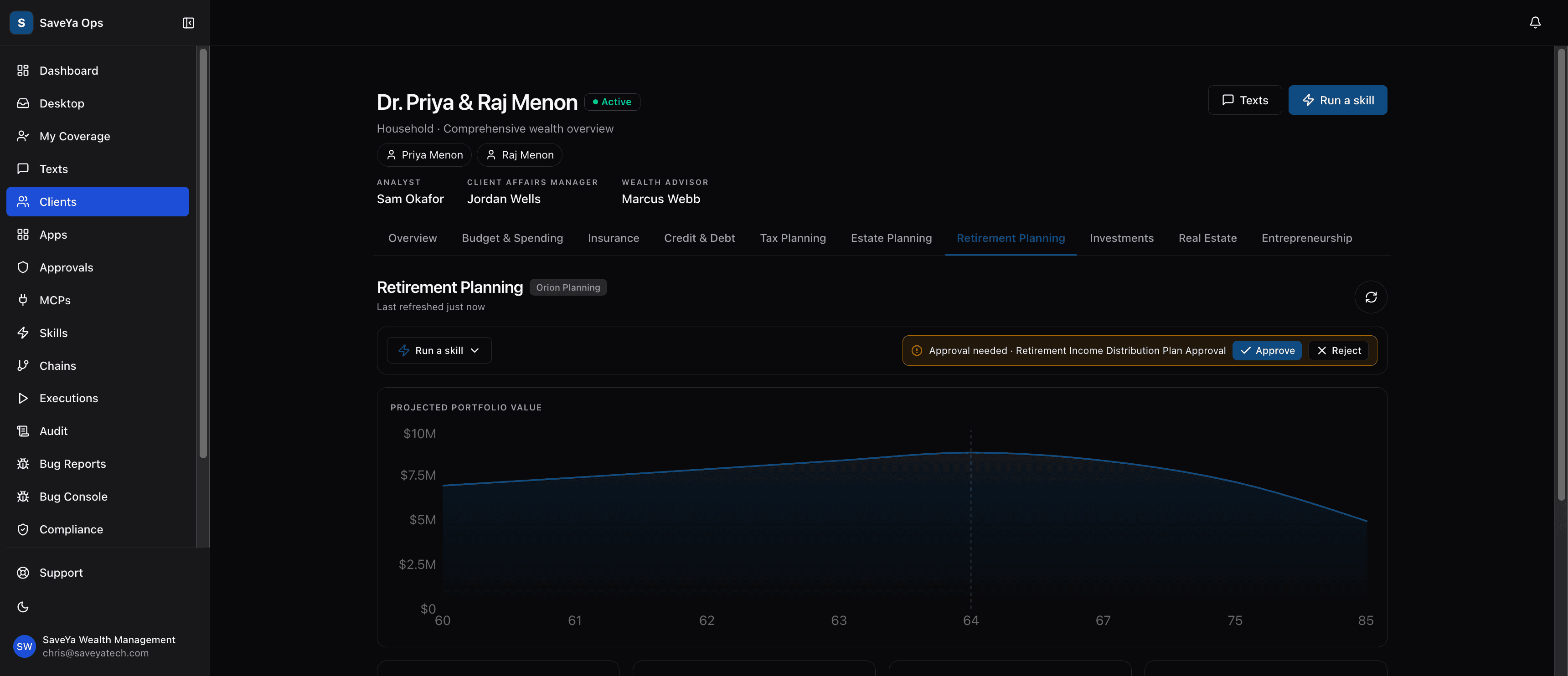
Planning & approvals
A person approves before anything moves.
Planning data flows in from Orion with an approval banner front and center on the screen.
The plan waits for a human to approve or reject it before anything happens. Nothing consequential moves on its own.
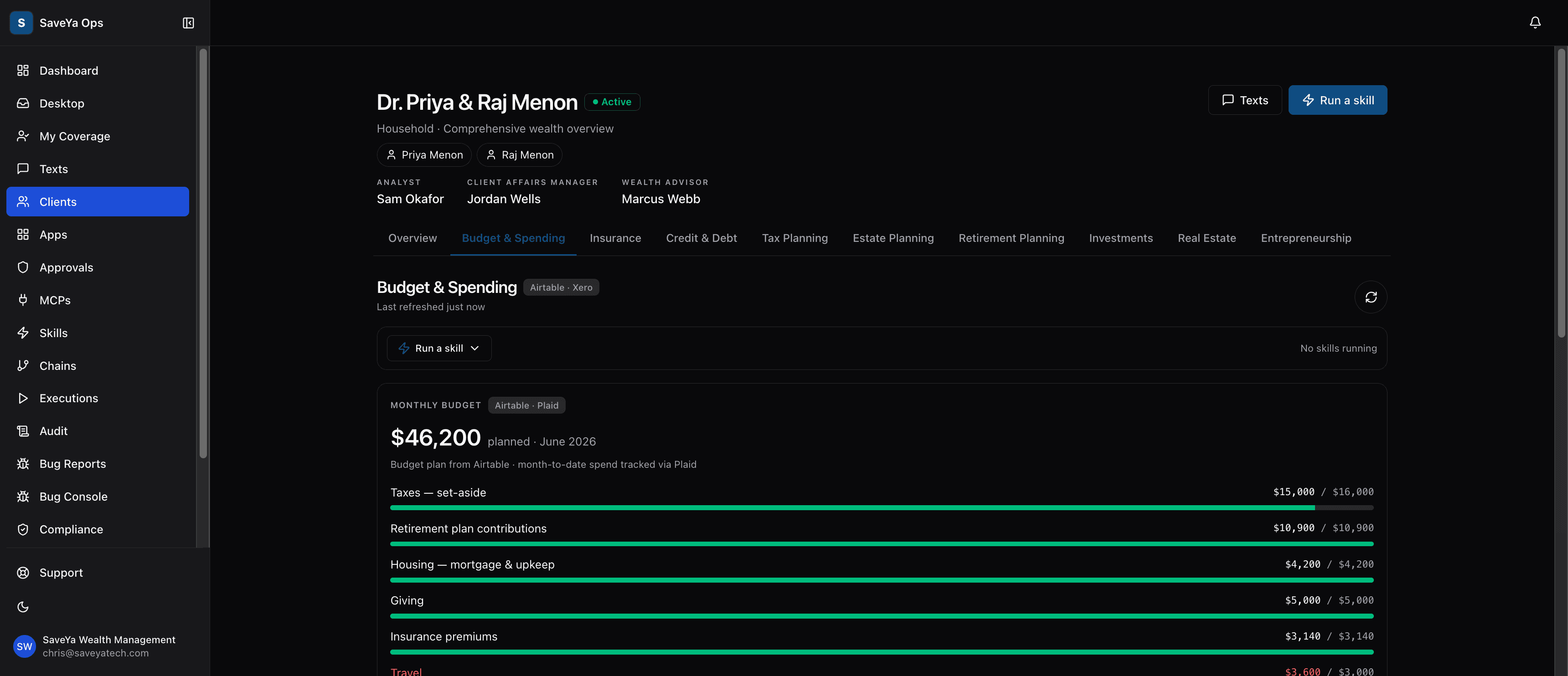
Budget & spending
The books, watched automatically.
Monthly budget against actual spending, fed straight from the firm's accounting stack.
Category by category, the numbers stay current without anyone updating a spreadsheet.
We never put real client data in marketing. These screens use fictitious households.
Why It Was Possible
The security posture came first.
Security was the gate this whole project had to clear, so we designed for it from the start rather than bolting it on. This is what let a firm handling SSNs and bank accounts say yes to AI.
Sensitive fields are masked by default
Account numbers and balances show the last four digits and nothing more. The most sensitive information flows system to system without ever being displayed on a screen.
Every automated action is logged
Each action the system takes is written to an append-only audit log. There is a complete, timestamped trail of what ran and when, ready for supervision to review.
Compliance records are written once
Records are committed to immutable, write-once storage designed around SEC record-keeping rules, with a multi-year retention lock. Once a record is written, it cannot be altered.
Approval gates guard every write
Anything that writes to the client's books or files stops at a human approval gate first. The firm decides. The system does the work and holds for the yes.
Access is locked down
Multi-factor authentication runs through authenticator apps, credentials are kept in a vault, and permissions are set at the user level so people see and touch only what their role allows.
The firm owns the ground it runs on
An outside security review was run by the firm's own IT vendor, and the system was moved onto infrastructure accounts the firm owns. If we disappeared tomorrow, they keep the system.
AI can make mistakes, which is exactly why anything consequential keeps a human in the loop and lands in the audit trail. We are integrators, not self-certifiers: we build to the standards your compliance program answers to and give your team the records and controls to supervise it. The full detail is on our security page, and the same posture runs across everything on our platform.
How We Work Together
It started small, then it grew.
We did not start with a twelve-month plan. We started with one small, fast-track build delivered in about a week, so the firm could see real work happen before betting the back office on it. That first win grew into the full managed relationship it is now.
Since then, it has been a standing partnership. We hold weekly working sessions with the founders. The firm's staff file bug reports and design requests directly in the app, and the founders ship the fixes. The principal can even open a shared design workspace and edit the dashboard himself, and we ship what he changes.
That is the point of building custom instead of stitching together generic tools: the system bends to how the firm actually works, and it keeps getting better every single week.
Where It Stands
Live today, firm-wide.
This is not a pilot sitting in a corner. The firm's whole team uses the platform daily, with permissions set to each person's role, and the automated jobs run around the clock. Nothing lapses. Month-end stops being a slog. No dollars move without approval. Every client message is on the record.
The outcome the firm was after was never a number on a slide. It was quiet: the back office simply runs, the compliance trail is always there, and the team spends its time on clients instead of admin.
Is your back office still run by hand?
Tell us how the books, bills, and compliance work at your firm today. We will map exactly what we would automate, and where the human approval gates go.
Book a $250 ConsultThe consult: one hour with the team, not a salesperson. You leave with a real number. The $250 comes off your build if you move forward. You pick your time right after checkout.
What working together looks like
A build phase, usually three to six months, where we scope and build the systems your firm runs on and keep adjusting them as your team actually uses them. Pieces go live along the way rather than all at the end. After that it moves to a maintenance phase at a lower monthly rate, where we keep it running and keep adding to it.
You work directly with the two people who build it. Matthew spent nearly three decades building automation for hospitals, banks and pharmaceutical companies before this. There is no account manager in between.
We can build on infrastructure your own firm owns, which is what one client did after their IT vendor reviewed it, so if we disappeared tomorrow they keep the system. We carry technology errors and omissions and cyber liability insurance, and the platforms we build on hold SOC 2 Type II reports and offer signed business associate agreements.
Referred by someone? Tell us who sent you and we will pick it up from there. Or ask Hank first, any hour, no charge.