
Every installment scheduled.
Every reminder approved.
Payment Plan Manager turns an outstanding client balance into a structured plan. Pick the client and invoices straight from Clio, choose a cadence, and every installment is generated the moment you save. Reminders queue for your approval before a client hears anything, and payments reconcile back to the plan on their own. The balance always tells the truth.
Built on SaveYa Ops: every action logged, every plan tenant-isolated, approval gates everywhere money moves.
What it is
Tens of thousands in receivables. One system that never forgets to follow up.
Payment plans die in spreadsheets. Somebody has to remember who owes what, which installment is late, who got a reminder last week, and whether that check ever cleared. This app remembers all of it. The plan, the schedule, the reminders, the fees, and every dollar received live in one place, with the arithmetic done for you and a human sign-off in front of anything a client sees. It's the collections half of the AI automation we build for law firms. The same approval-gated, audit-logged billing discipline carries into the work we build for wealth managers.
How it works
From outstanding balance to paid in full.
01
Create from Clio
Pick the client and the app pulls their outstanding balance and open invoices live from Clio. Set the cadence. Payment count and amount compute off each other.
02
The schedule generates
Every installment is created the moment you save: monthly, weekly, bi-weekly, twice a month, or one-time. Any single row’s date or amount stays editable.
03
Reminders ask first
Due-date reminders and late-payment escalations queue with the exact message the client would get. You approve or reject each one. Nothing sends itself.
04
Payments reconcile
Webhook-confirmed or marked paid by hand, the plan rolls forward: balance down, payments-made up, and it flips itself to Completed at $0.
The approval queue
Nothing reaches a client until you approve it.
Every prepared message, whether a due-date reminder, a missed-payment nudge, or a monthly fee notice, lands in the Notifications queue as one card with the actual email and text the client would receive. Approve it, reject it with a reason, or approve a batch at once. Escalations tier by how late the payment is, and queued reminders expire instead of firing weeks later.
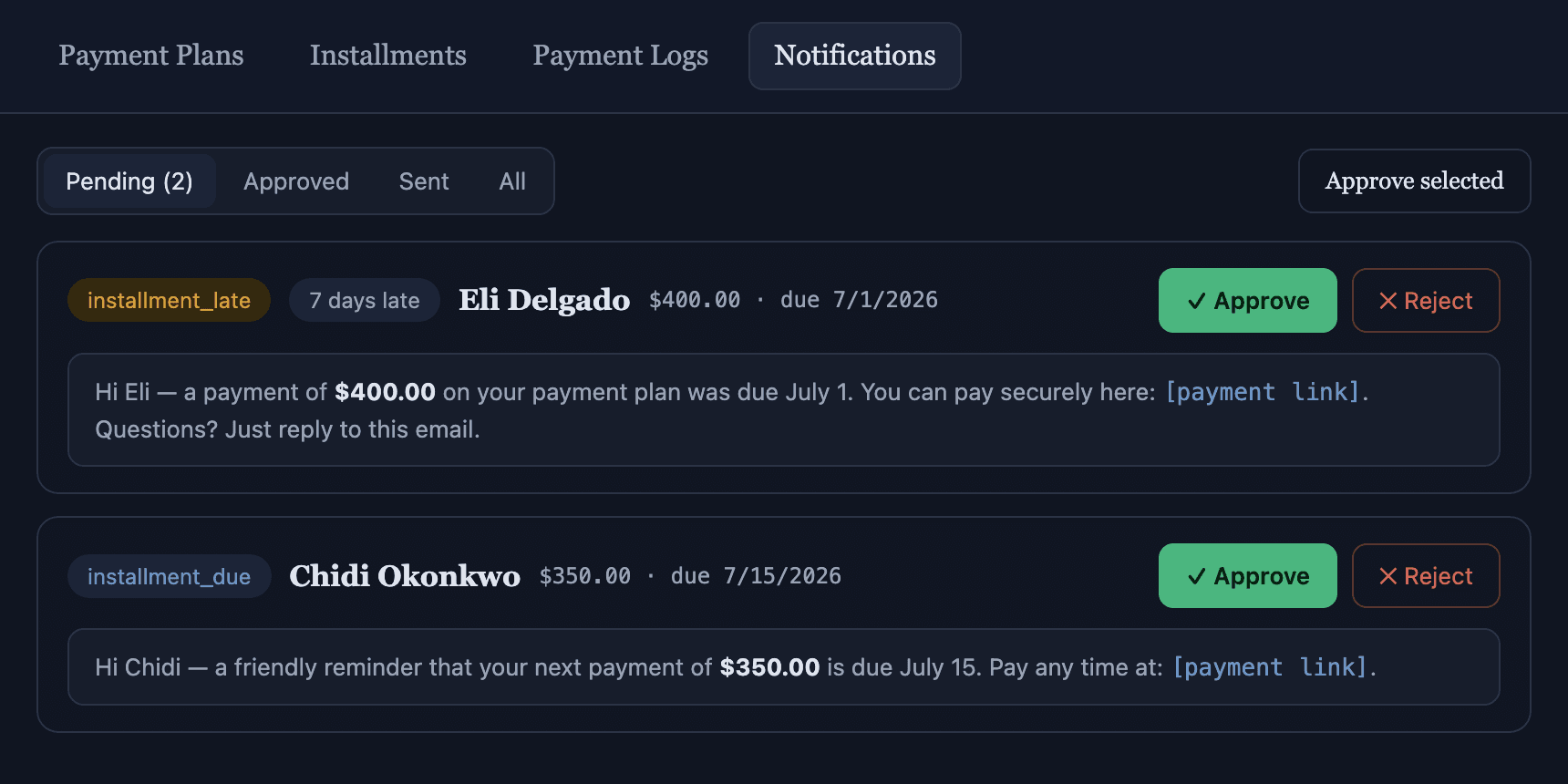
The Notifications queue from the demo tenant: a 7-days-late escalation and a friendly due-date reminder, each waiting on a human.
The plan book
Every plan. Every balance. Current.
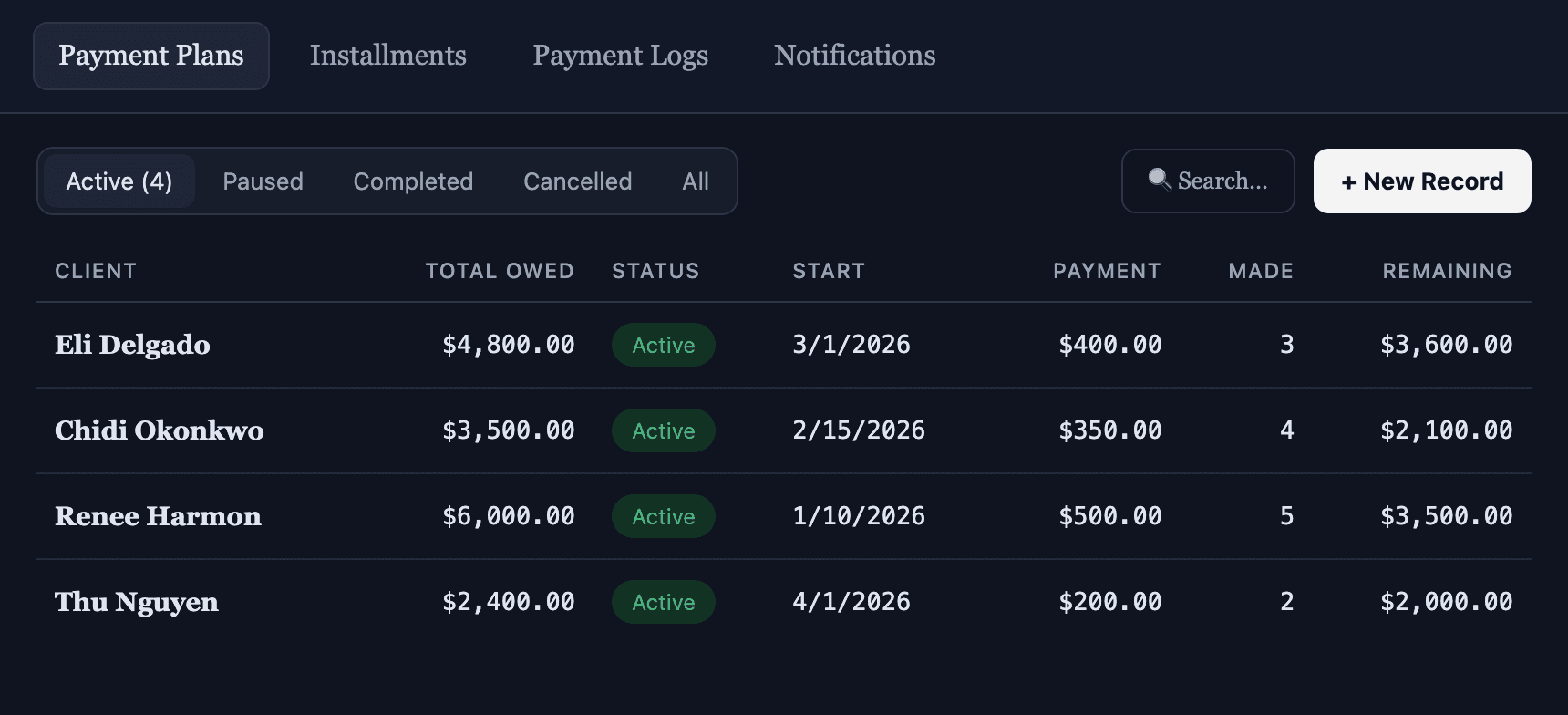
The master list shows what matters at a glance: total owed, per-payment amount, payments made, and the live remaining balance, with status tabs for Active, Paused, Completed, and Cancelled plans.
A dispute or a hardship? Pause is one click. All automation skips the plan, nothing is deleted, and flipping it back to Active resumes on the next run.
The schedule
Installments that mind themselves.
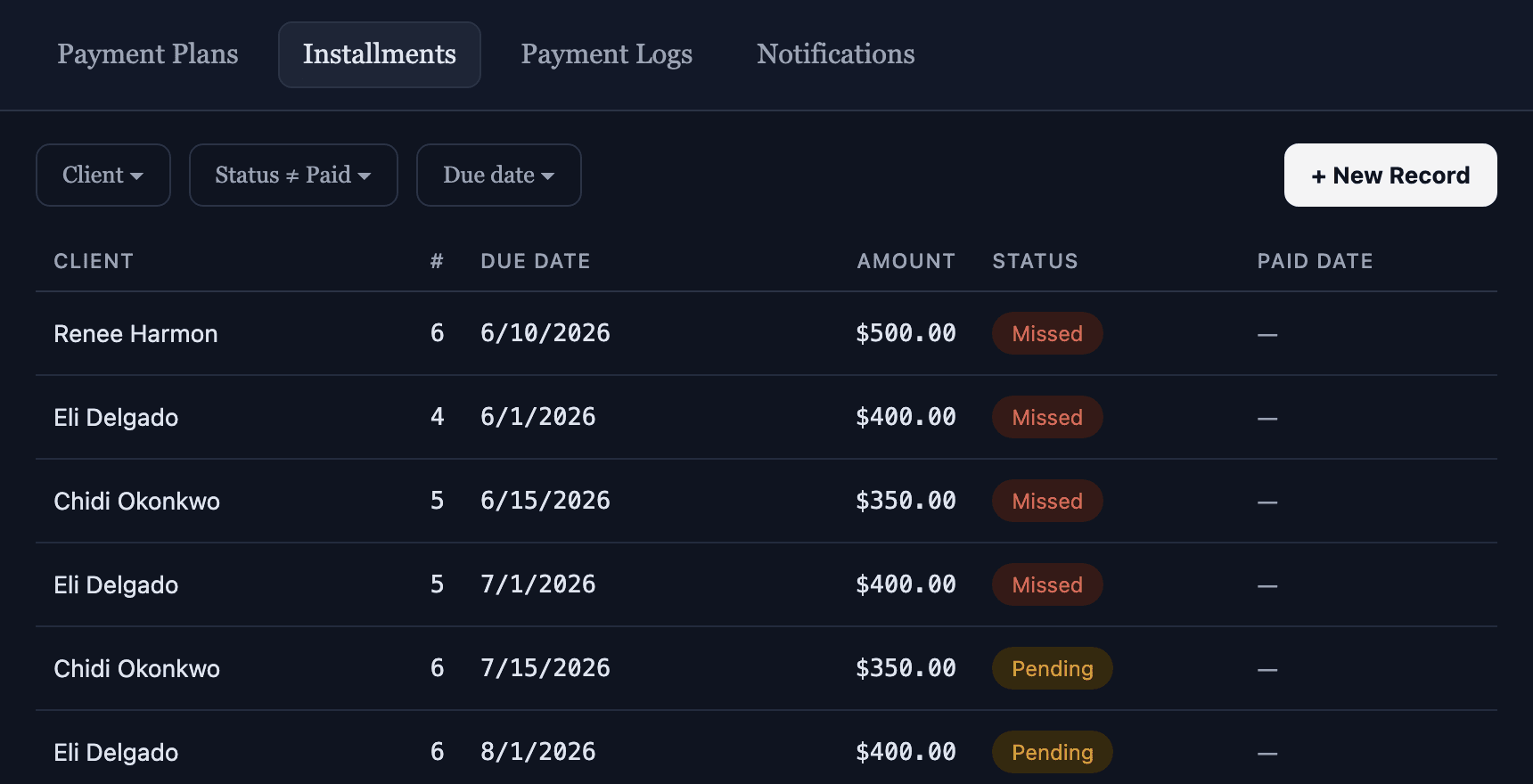
One row per scheduled payment, generated the moment the plan saves and sorted into a working queue: paid rows filter out, missed rows surface. Client negotiated a different date for one payment? Edit that row, and reminders follow it.
Missed installments feed a tiered collections ladder at 1, 3, then 7 days late, each a firmer message, each still gated by your approval.
Plan creation
Clio does the data entry. You make the deal.
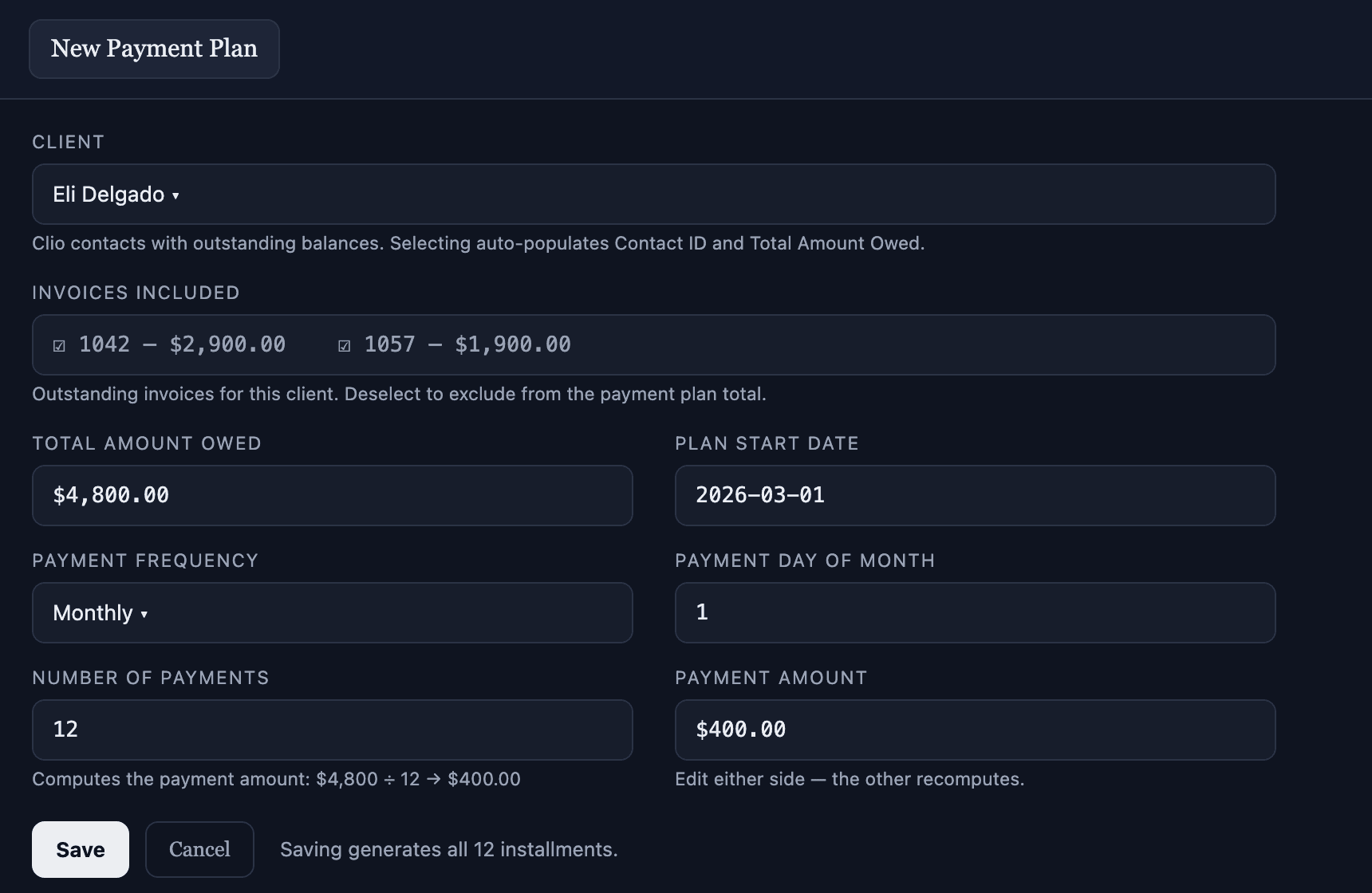
The form reads live from Clio Manage: pick the client and their outstanding balance fills in. Their open invoices load, all selected, with the total re-summing as you include or exclude them.
Set 12 payments and the amount computes. Set a $400 payment and the count computes. Saving writes the whole schedule, and it warns you about anything that would trip up automation later.
The money math
Mark it paid. The plan reconciles itself.
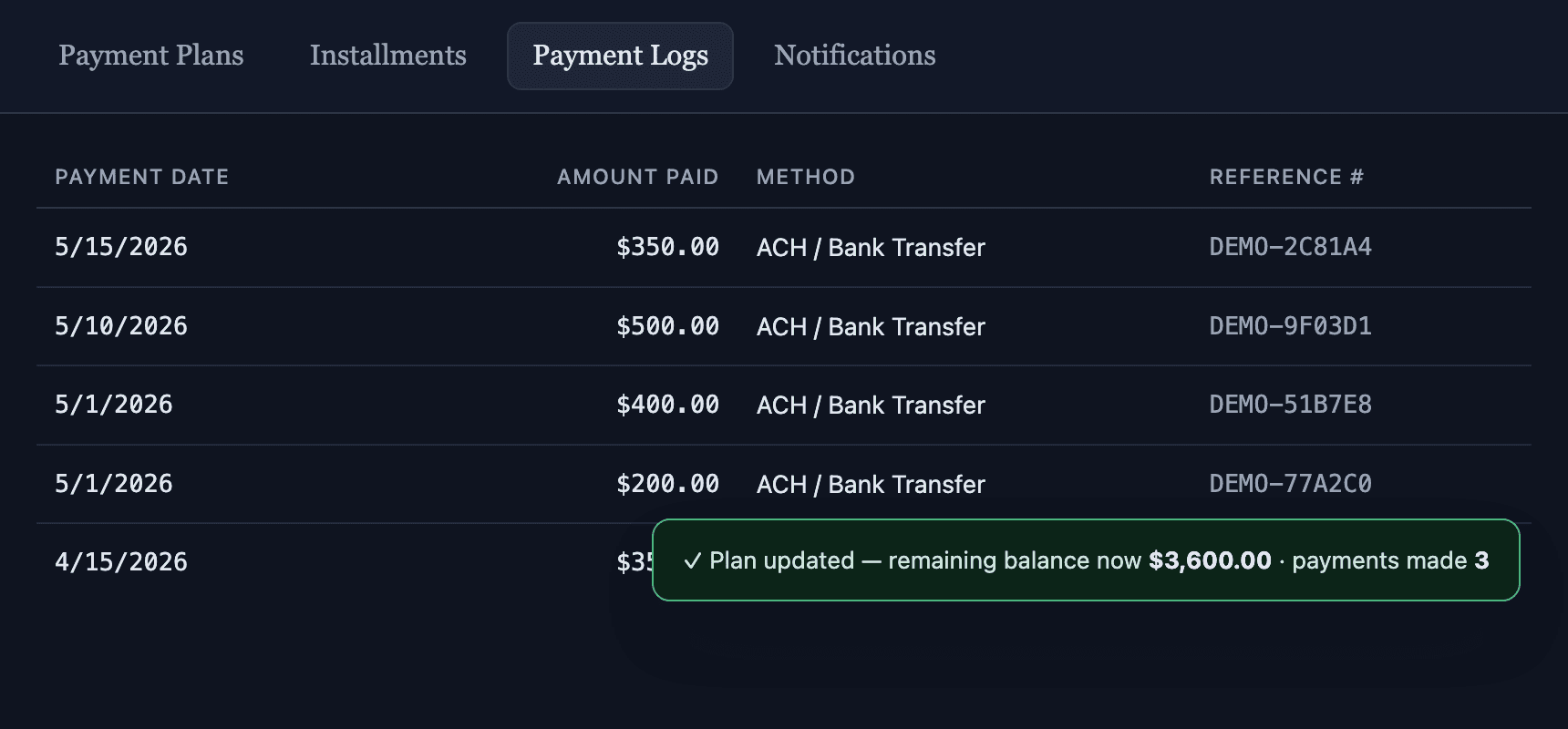
Check, ACH, card, or cash. Flip an installment to Paid and the parent plan rolls forward in the same save: balance down, payments-made up, total-paid up, and an automatic flip to Completed at $0. Every payment lands in the log with its method and reference number.
Webhook and manual payments never double-count, and the app never silently reverses money math. If something needs a human, it says so out loud.
The monthly service fee
A plan-maintenance fee, billed without thinking about it.
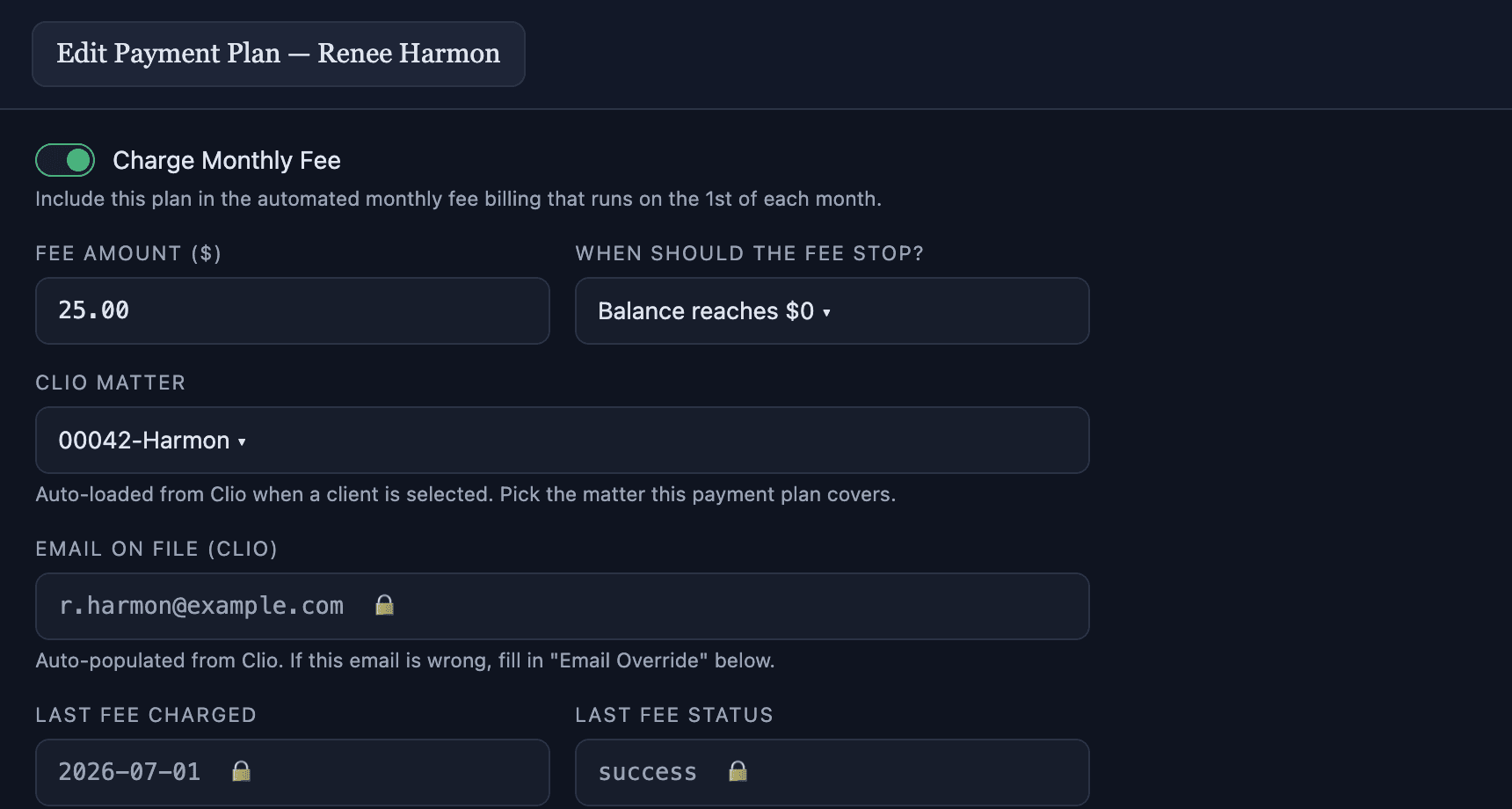
Firms that charge a small monthly fee on payment plans flip one toggle. The fee bills on the 1st of each month, stops itself when the balance hits $0 or on a fixed end date, and writes back exactly what happened on every run.
In a summary email after every run, skipped plans are named with their reason: missing matter, no email, or already charged. The system never fails silently.
Why you can trust it
Built for the part of the practice that touches money.
Approval gates on every send
Client-facing reminders queue for explicit human approval. Auto-approve exists, but it’s a setting your firm turns on, never a default, and every flip is audited.
Nothing fails silently
Every automated run ends in a summary email. Even a run that found nothing to do says so, and anything skipped is named with its reason.
No double-counting
Webhook payments and manual marks reconcile to the same row exactly once, and the app never auto-reverses a balance. It asks a human instead.
Clio stays the source of truth
Balances, invoices, matters, and client emails come live from Clio Manage. The plan starts from the numbers your billing system already agrees with.
Reversible by design
Pause suspends a plan without deleting anything. Rejected reminders record a reason. Completed happens automatically at $0, never by guesswork.
Platform-grade security
It inherits everything SaveYa Ops guarantees: append-only audit trail, tenant isolation, fail-secure permissions, and vaulted credentials. See how we handle security.
Start here
See it run on your own receivables.
Bring your AR aging report to the consult. We'll scope what payment plans look like on your real balances, your billing system, and your follow-up process, and you leave with a clear plan and a real price. It runs on the same SaveYa Ops platform behind our live law-firm intake system. Building the case itself? See Case-File Fact Extraction.
The consult: one hour with the team, not a salesperson. You leave with a real number. The $250 comes off your build if you move forward. You pick your time right after checkout.
Every screen on this page is from the fictitious Eli Delgado, Chidi Okonkwo, Renee Harmon, and Thu Nguyen demo payment plans. No real client data appears anywhere.